About telemetry and reporting for customer instances
With Replicated, you can get out-of-the-box visibility into your application instances running in customer-controlled environments. For example:
- Metadata about the environment where the application is running, such as the Kubernetes distribution, Kubernetes version, or cloud provider
- Application uptime and service status Adoption data such as the current application version
Replicated also supports collecting custom metrics for reporting on usage data such as daily or weekly active users of the application.
In contrast to traditional observability, which often includes a firehose of logs or key-value pairs from a database, the goal of reporting with the Replicated Platform is to provide insight on application usage and functionality.
For vendors, access to reporting data empowers the team to take more informed action: Usage data can inform prioritization decisions about feature development. For example, low feature usage can indicate the need to invest in usability, discoverability, documentation, or in-product onboarding. Adoption data, such as the version that each customer running, can be used to understand and monitor the CVE data for each customer's deployed instances Decreased or plateaued usage for a customer can indicate a potential churn risk, while increased usage for a customer can indicate the opportunity to invest in growth, co-marketing, and upsell efforts. Performance data, such as simple uptime data, helps more quickly troubleshoot and resolve issues. Uptime data can also help vendors understand the resiliency of their software, which is important for both operability and security.
Enterprise customers also often expect access to this reporting data through formats such as dashboards, data exports, reports, or notifications. For example, customers like to see their usage data to make sure they're within their contractual limits. This is especially useful for air gap customers, who will typically self-report when they are over usage limits in order to get back into compliance with the contract. Scope and Prioritize Security Issues Having a robust reporting framework that is associated with each customer’s unique license can also be critical for scoping, prioritizing, and communicating security vulnerabilities to enterprise customers.
When there is a known CVE in a third-party library that’s part of the software supply chain, or when a security bug is discovered in the application itself, vendors need a way to identify which customers are affected and to what severity. Usage and adoption data such as the version that each customer is running and which features each customer has access to can help vendors determine who they need to notify and how to prioritize fixes across customers. For example, if there is a vulnerability in a specific version of the software, then vendors can notify the affected customers before publishing a public disclosure. Or, if certain customers have features or entitlements that reduce their actual risk, then vendors can tailor the message they send to those customers accordingly.
Cutom metrics with the SDK
In addition to the built-in insights displayed in the Vendor Portal by default (such as uptime and time to install), you can also configure custom metrics to measure instances of your application running customer environments. Custom metrics can be collected for application instances running in online or air gap environments.
Custom metrics can be used to generate insights on customer usage and adoption of new features, which can help your team to make more informed prioritization decisions. For example:
- Decreased or plateaued usage for a customer can indicate a potential churn risk
- Increased usage for a customer can indicate the opportunity to invest in growth, co-marketing, and upsell efforts
- Low feature usage and adoption overall can indicate the need to invest in usability, discoverability, documentation, education, or in-product onboarding
- High usage volume for a customer can indicate that the customer might need help in scaling their instance infrastructure to keep up with projected usage
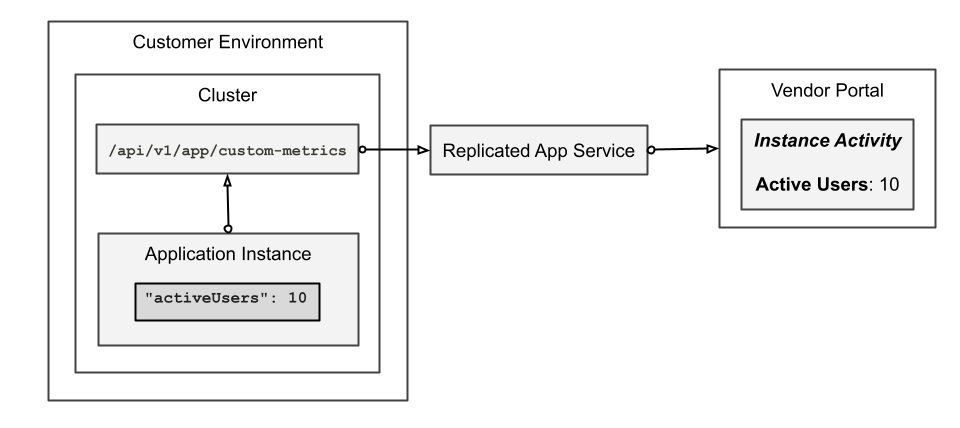
The following diagram demonstrates how a custom activeUsers metric is sent to the in-cluster API and ultimately displayed in the Vendor Portal, as described above:
View a larger version of this image
Air gap telemetry
When reporting on instances of enterprise software, vendors should adhere to principles of transparency, privacy, and customer choice: Publicly disclose what data elements and fields are transmitted by providing clear documentation. Not only do enterprise customers appreciate this information up front, but many will require it according to their compliance framework Redact sensitive data (such as database connection strings, passwords, or other API tokens) from being sent back to the vendor environment Give customers the opportunity to opt in or out of sending different types of data. For example, some customers might opt to send nothing, or to send only diagnostic data used for support purposes
This helps to build trust between the vendor and customer in that security-minded enterprise customers can be assured that the vendor will not collect more data than was agreed to, nor expose them to potential security or privacy concerns.
Transparency, privacy, and customer choice are also critical for reporting on air gap instances, which present unique challenges due to the lack of outbound internet access. Software vendors can collect reporting data for air gap instances by providing opportunities for customers to send redacted data when opening a support request, or through regular surveys. Collecting reporting data from air gap environments on a regular basis (such a monthly or quarterly) can help give software vendors a more complete picture of how customers are using their software, while providing air gap customers valuable insight into their usage.
Event notifications
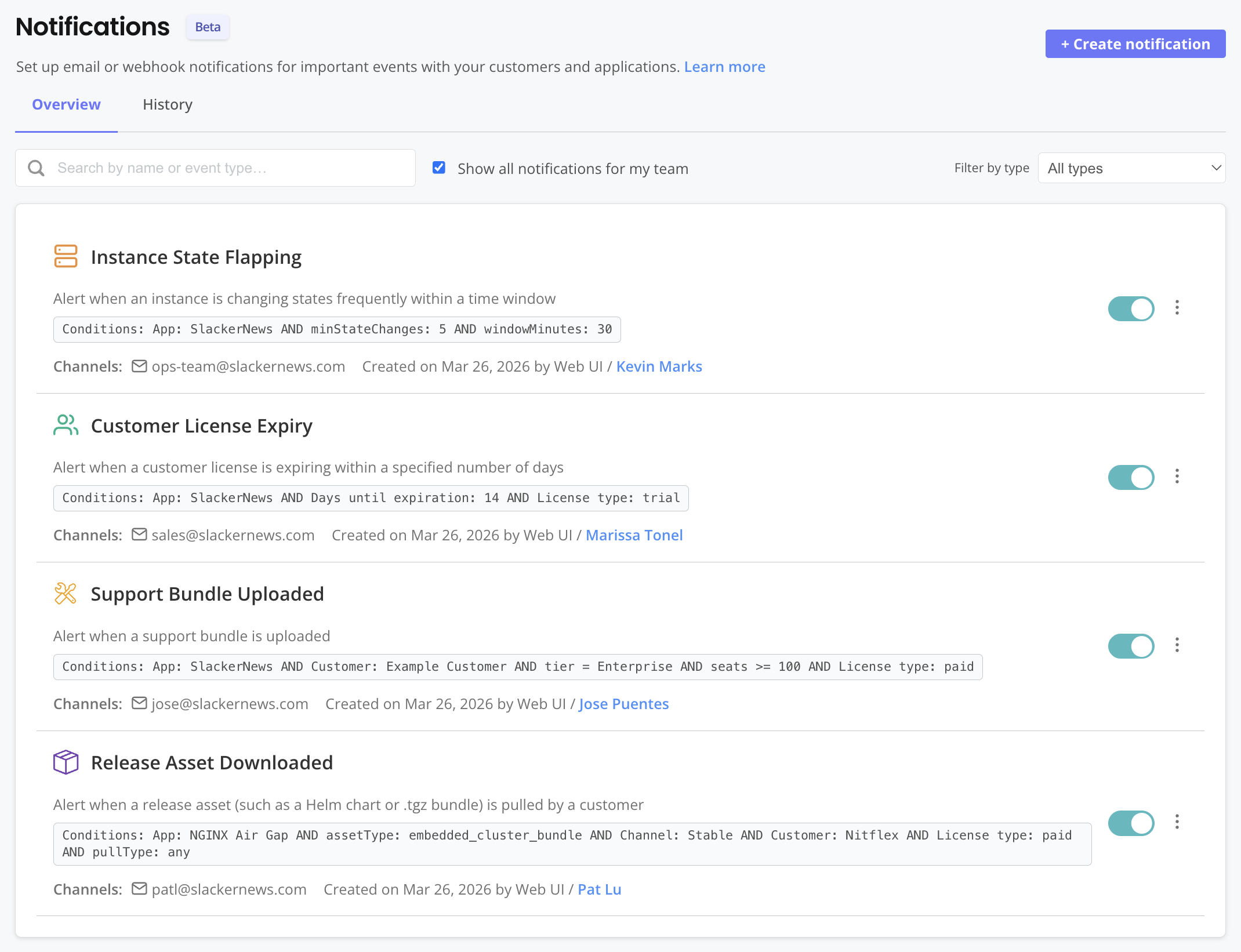
You can define and subscribe to notifications in the Vendor Portal to receive alerts when specific events occur. Built-in event types and filters allow you to create highly-targeted notifications for the events that matter most to your workflow. For example, Customer Success Managers could get an email notification when a key customer uploads a support bundle. Or, Support Engineers could get a Slack notification when a customer instance has been in an unhealthy state for an extended period.
The following shows an example of the notifications Overview page: